
 Have you heard of Google+ post ads? If not, here is a brief rundown and prepare to be excited!
As of April 2014, all Google+ brand pages with 1000+ followers are eligible to make use of Google+ post ads. These completely interactive ads allow advertisers to have their Google+ posts shown on 3rd party sites across the Google Display Network.
In case you are not familiar with the Display Network, here’s how it works: Advertisers can choose to have their ads shown not within Google’s search results (which is what we typically think of when we think Google ads), but on sites across the web.
With Google+ post ads, advertisers can promote their Google+ posts on the Display Network to reach a larger audience; and because these ads are interactive, viewers who are logged into their Google account can +1, share or comment on the posts without ever leaving the site they’re on.
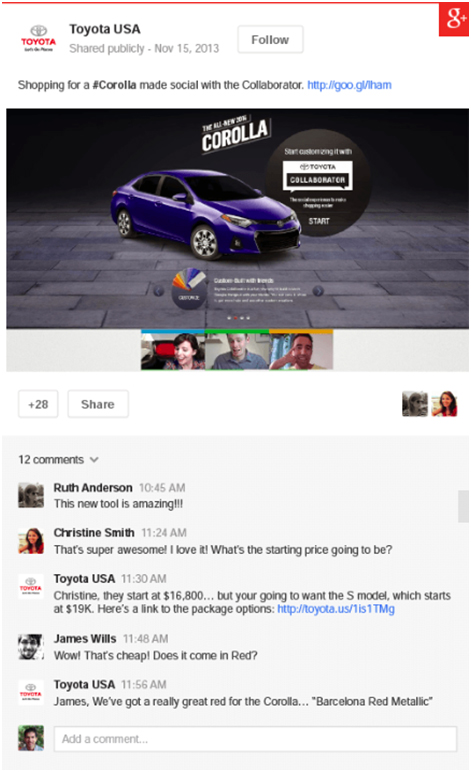
Example of a Google+ Post Ad
How Can I Use Post Ads?
Google+ ads are being touted as a way for people to view and understand the bigger context surrounding your content. According to Google, “Ads become more relevant within social context. Comments, +1’s, and shares from friends can move people to engage with your ad. Social actions on ads and Google+ add up together, showing the full picture of engagement with your content. +Post ads expand in a lightbox to bring full screen social creative across the web”.
We know that social proof and word of mouth are important factors when it comes to building trust and loyalty for your business; and one of the best ways you can incorporate these elements into your online advertising is by using +Post ads.
Here’s what I mean: Imagine you see a display ad on a website. It’s a straightforward advertisement, perhaps a video or a photo with some text and a website link. Now imagine you see a similar ad, BUT you notice it has 50 +1’s and a bunch of comments underneath it. Which would you be more likely to click on?
How to Get Started Using +Post Ads
Keep in mind that +Post ads are currently only available to brand pages with over 1000 followers. You’ll also need to make sure you set your account to ‘public’ and have shared endorsements turned on. If this is you, here’s how to get started creating your first ad!
1. Login to your Google AdWords account.
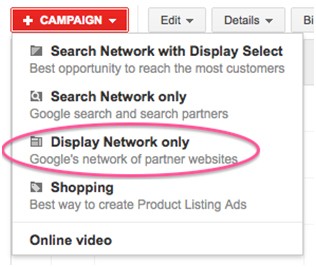
2. Click on + Campaign (new campaign).
3. Select ‘Display Network only’.
4. Set up your campaign as you would a normal AdWords campaign, including languages, devices, locations, budget, etc.
5. Select ‘Engagement’ under ‘Choose a campaign type to switch to’.
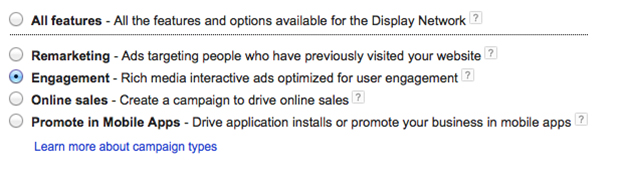
6. Click save.
7. On the next screen, you should see a ‘Create ads’ tab: click on the +Post ad template.
8. Enter your Google+ page url on the ‘Select a Google+ page’ menu.
9. You should now see a list of all your latest Google+ posts. Select the one you’d like to promote.
10. Click ‘Customize’ to change the settings and appearance of your ad.
11. Click ‘Save ad’, and you’re done!
The advantages of using Google+ post ads are clear: they take your Google+ content and catapult it across the web. Not only does this increase the visibility of your content and help you reach a completely new audience, it allows people from across the web to find and interact with you on Google+ without even being on Google+.
This means it has the potential to drive traffic to your website, spread awareness of your business, and increase your Google+ followers, all in one fell swoop.
These are ads I will definitely be keeping an eye on!
For more tips on using Google+ for your business, see my other posts:
Why Google Plus is a Must for 2014
4 Ways to Generate Income Producing Leads on Google+
10 Simple Tips to Take Advantage of Google+ for SEO
Have you tried +Post ads? What kind of results did you achieve with them? Share with us below!
Images courtesy of Google
About Author


4 thoughts on “Google+ Post Ads: What They Are and How to Use Them”
Thank you so much for reading our posts. We really do love helping and connecting with really great people! – Boom Care Squad – Aida
I think there is and will always be, a rivalry there for sure 🙂
Louis,
No, it means that your ads will show up on other sites. Booom Care Squad – Aida
Glad you got some value from this one! Thanks for dropping in!