
Is your business ready for Facebook Graph Search?
This could be the biggest thing to hit the Internet since Google. Seriously!
For your business, this new search tool represents an exciting new way for you to find customers, followers and for customers to find you.
So what is Graph Search?
Graph Search is Facebook’s latest feature and it’s being rolled out to users in the coming weeks. Some have it and some are still waiting for it to show up. Graph Search will allow users to search through Facebook’s content. It’s a search engine that searches only within Facebook. Unlike Google, results on Facebook will be more specified for each user and his or her social network.
The results will be based on three factors: Keyword, Category and Connection.
Keyword – Similar to Google, Facebook will scan all of the content on Facebook for words that match the user’s search terms. Unlike Google, the search results will be limited to Facebook content within the searchers network.
Category – In putting together search results, Facebook will scan the Categories that pages use to self-define their business. This is particularly important for Business Facebook Pages.
Connection – This is the key! Facebook will prioritize results based on who the searcher knows and who is in their larger network. (Friends and friends of friends for example.) Because we all prefer to take recommendations from people we know, Facebook will show results based on people within our networks and also relate them to location.
I still don’t get it. How does this work?
Let’s say a user searches for “Web Design” on Facebook’s Graph Search. Facebook will scan for the keywords, “Web Design” placing particular emphasis on looking for businesses that have Web Design listed as their category. Facebook scans profiles and pages for likes, check-ins, posts and comments. It’s important to remember that Facebook will only scan within the searchers network, so results are limited to pages with a connectionto the user. Connection can relate to physical location or shared connections that have liked, commented on or otherwise interacted with a page.
So how can you get your page ready for Facebook’s Graph Search? Dedicate some time to updating your Facebook Page. Just follow these 7 simple steps – and get ready for customers to start finding you!
1. Update Your Category
Take a few minutes to think about how you have categorized your business. Make sure the category describes what you do as accurately as possible. Your page category will hold significant weight in search results.
2. Location, Location, Location
Graph Search will look at the location of the searcher in relation to the location of businesses and other users, giving priority to results that are geographically close by. Make sure you have up-to-date address information on your Facebook page.
It’s also important to encourage your fans and friends to Check In to your business. This will help boost your ranking and the strength of your geographical location.
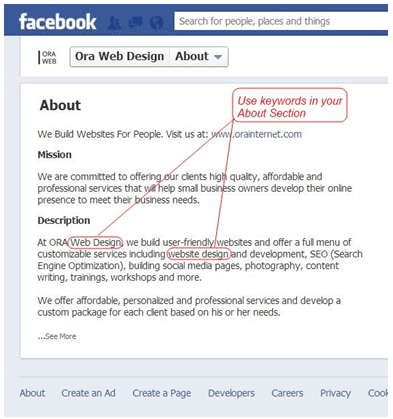
3. Write Your About Section with Keywords In Mind
When writing the About Section for your Facebook Page profile (see above graphic), think about what keywords your potential clients will be looking for. Use as many keywords as possible, but make sure the content is coherent and reads well. Use words that not only describe what you do, but also relate to specific search terms that you want to link back to your site.
4. Keywords are Key – Use them in Tags!
Graph Search will look at Tags when analyzing results. So Tag pictures and write posts using your keywords. Encourage your customers or clients to tag your business as much as possible as well. Whether posting new photos, links, graphs or video clips, tag them profusely.
5. Content
Now that your Facebook content will be searchable, producing informative and compelling content on your Facebook page will be much more important. Post as frequently as you can.
Write posts that not only use your keywords, but also will attract likes, comments and interactions. Give people content they can use – whether to make them smile and laugh or to help them in their life in some way.
If Facebook sees that people are interacting with your page, it will get higher priority in Search results. And a larger network of followers on your page will mean you have a better chance of showing up in results. Each new Like or Follow connects you to a whole network of new potential clients!
6. Do Your Research.
Facebook’s Graph Search is new! New developments will be coming out all the time and even the experts are still learning exactly how Graph Search will work and how it can be used to help your business. Keep reading and learning about this new tool to make sure you know how to use it to best help your business.
7. Get on Early!
One of the best ways to ensure your business is on board and showing up in searches is to start using the tool as soon as possible. Facebook is releasing Graph Search in Beta version to users slowly. If you want to be one of the first ones to graph search you can sign up here to join the waiting list here: https://www.facebook.com/about/graphsearch
To sum it all up…
Graph Search is a whole new world and while it may seem daunting, it should be pretty simple to learn to use. Keep in mind the three keys – Keywords, Category and Connections – and you will master it in no time.
This new tool has incredible opportunity to help your customers (and their friends – and their friends’ friends) find you!
Most successful businesses know that the best kind of advertising is word of mouth – and Facebook Graph Search allows you to incorporate the power of personalized recommendations with the large scale of social media.
About Author


18 thoughts on “7 Steps to Prepare Your Facebook Page for Graph Search”
If only they would get it turned on!
It is tough to wait right?
Fantastic article Kim! Thanks!
I agree with Shirley – really great stuff. I'm admittedly out of the loop. But jumping in. Also not familiar with tagging key words – please say more. Thanks!
Hi Kim, A nice post again, really your explaining method is nice with an image. Your step by step explanation is good. Thanks for sharing it. keep blogging…:-)
Awesome to hear you got some value from the article!
Charu, glad it was helpful to you!
Great break down on the "how-to's" for FB's Grapic Search. Putting your steps into place. Thanks, Kim!
Love hearing this, Livvie!
I didn't know about that we can use the keywords in about section. It will gonna give us some SEO benefit i think.
It is definitely worth mentioning that this approach is no different than how you should have been running your Facebook page in the past, as well as the future. I don't see this as changing anytime soon 🙂
I think it will allow us to find more targeted connections via Facebook.
Thanks Denny!
Being prepared is a good thing right :-)?
This was super information for me as I hadn't even filled out my about section!!! Got it all done and now hopefully will grasp the rest. Thanks!
I appreciate all these tips Kim! I haven't started getting ready yet, but will now that I know what to do. 🙂
I would have to agree with you, Michael. Especially as it relates to a full-bodied search tool, however, I do think, Graph Search has good bones and they will continue to refine it. Ultimately, I think they have to in order to stay competitive.
I never really considered using keywords for Facebook. Awesome!