
You've probably heard of Google+ hangouts. If not, they allow you to host video conferences with up 9 other people at once. Hangouts totally take phone conferences to an amazing new, FREE level.
But now, you can host Google+ Hangouts “On-Air” which means that you can broadcast a Google+ Hangout to an unlimited audience. This is not just for the first 9 people, but also for as many people as possible! Until recently, this feature was only available to big businesses and select audiences.
If that isn't good enough, Google+ Hangouts On Air also gives you the capability to record your session to later post and share!
So, how do you REALLY record your Google+ Hangout?
1. Log into Google+, open your homepage and click on “Start a hangout”.
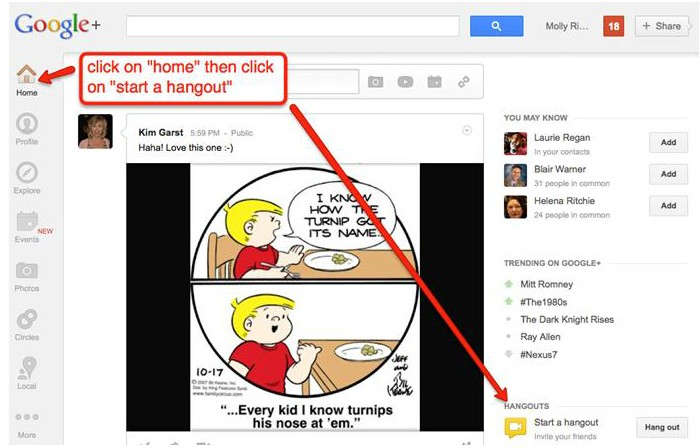
2. Name Your Hangout and Invite People.
Recording Tip #1: Give your hangout a unique name. This way other people won't accidentally jump into your hangout because they are trying to start one with the exact same name.
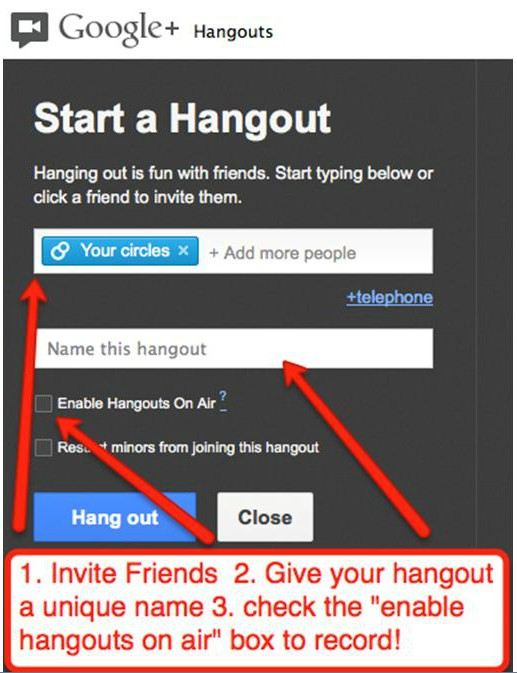
3. Check the “enable hangouts on air” box to record your hangout!
See the picture above. There, you will find the box to enable hangouts on air so that you can record it.
NOTE: This will also cause your hangout to be aired LIVE on your YouTube channel and on your Google+ stream. This is a GREAT automatic feature because any of your followers on YouTube and Google+ will be reminded to join when they see you talking live!
Anyone who joins into your hangout will be notified that the hangout is being streamed live on YouTube. This way, if they wish not to be apart of the hangout they can choose not to enter.
4. Agree to Google's Terms of Service
As with any terms of service it will behoove you to READ through them the first time. This way there are no surprises later. This is especially important if you are hosting the hangout for another company or your boss.
5. Click Continue to Start Your Google+ Hangout –
When you click continue your Google+ hangout session will start. You will then have the choice to either wait for others to join you or start broadcasting live without them.
6. Recording Your Hangout
Once your broadcast starts, you will want to click on the red “start broadcast” button. There will be a 10 second countdown to your live recording. This is your chance to adjust your hair, smile and breath!
7. AFTER your Hangout –
Your video may take up to an hour to process before appearing on your YouTube channel.
Once it has uploaded to YouTube, you can edit it on your “Video Manager” page. You can also share the link to the video from your video manager page.
Recording Tip #2:
Unless you've already recorded and uploaded a number of videos to YouTube your account probably has a 15minute video limit. This means that you will not be able to upload a recorded hangout that is more than 15minutes long.
To get around this restriction, log into YouTube and click on the link below to request more space.
http://support.google.com/youtube/bin/answer.py?hl=en&answer=71673
If you don't complete this step before you host your Google+ hangout YouTube will automatically cut it off after 15 minutes.
Recording Tip #3:
Before you jump into a presentation you can plan to incorporate a number of great apps to enhance your hangout. Two great apps include Scoot and Doodle and Cacoo. Scoot and Doodle is a fun app that allows you to draw on your screen as well as offering many other features! To check it out visit: http://scootdoodle.com/
Cacoo allows you to create diagrams online with real time collaborations. To check it out visit: https://cacoo.com/
So, now that you know how easy it is to record a Google+ Hangout, when are you going to get in there and play?
How will you use this for your business?
About Author


66 thoughts on “Step-By-Step: How to Record Google+ Hangouts”
I am in the learning stage of everything and then more and more comes out. Just seems to be a never ending learning experience. Thank you for helping 🙂
This would be a great way to communicate with your staff, Jan!
Thanks Kim!
This is so useful and really appreciate it!
Glad it was helpful, Christer!
Bookmarked! Another great post to reference. Thank you Kim!
Thanks for stopping by, Sara!
Oh! That is scary! I'd love to see one first. Thanks for the instructions though. I am thinking about it, just thinking right now. It isn't my breath I'm worried about either! Lol! : )
They are GREAT Christiane! Great ways to be face to face with peeps.
Great information, Kim! Thank you!
Thanks for stopping in Traci!
I'm definitely going to have to play around with hangouts .. thanks for all the steps! A 15-minute limit is a GOOD idea for me 🙂
Try ’em Becky! They are great ways to connect face to face with people!
Kim, thanks for the great and detailed information on recording a Google plus Hangout. I am bookmarking this page!
Glad it was helpful, Sherie!
Thanks, Kim for another great post filled with such valuable info. I will be bookmarking this as well 🙂
Great! Glad it was helpful, Susan! Thanks for stopping in.
Wow, Kim you bring so much to the table it's hard to digest it all. Google hangouts sounds like a simple, effective way to share my business with many at one time…I'll work on digesting this meal for sure.
They are simple and fun to use, Carla!
This is definitely bookmarked; you keep on stretching us Kim, which is good….without it we wouldn’t grow. I will have to work on this one though! Thanks!
You will love ’em once you have tried the Hangouts, Olga!
Great info, I will be to this point one day!
You can do it, Kerry 😉
I haven't tried this….YET. Don't count me out, just not there yet. 🙂
You will LOVE them once you try them the first time 😉
Another great post Kim. I have to print it out and digest it more. Love the graphics and the super tips.
Carol, glad you found it helpful 😉
Very very cool feature within Google + Hangouts! Thanks Kim for another awesome post!
Thanks Edmund!
You will love ’em, Lorii!
You can do it, Liz ;-)!!
Love these instructions Kim on yet another free feature of Google! Thanks so much! Great job!
This is wonderful… love the features. Thanks Kim great post!
Great features and easy to use instructions on how to record. Now to use Google +
As always, Kim, excellent content!
This is so great! Easy to understand since I am a novice at Google+ ! Marcy
Hey Marcy! Glad you found this helpful!
This is something I really should do sometime soon! Thanks Kim for shoiwng me how!
This something I've not tried yet but must soon! THank you, Kim for showing me how!
Carl, they are amazing!
I had no idea! Thanks for sharing this Kim! I may try this way instead of Skype!
You will love ’em Mandy!
Have you tried ’em yet?
Thank you for the how to. Google + hasn't taken off yet, I hope that hangouts and other 'new' applications which Google + are bringing out later this year will make a shift a reality and not just a blip in the social media world.
I think we are going to see a lot of value in Google+ yet.
Great Step-by-Step, Kim… looks like G+ Hangouts may have some good potential for one-on-one and group coaching calls as well as small mastermind groups. I'm going to have to experiment some with them!
They are great for one on one’s and small group coaching sessions!
Yes, there is now; using YouTube.
Do you have a screen recorder like Camtasia? That would be a great way to record if you are not the originator of the Hangout.
You could record the screen with something like Camtasia.
Glad the Google+ hangout info was helpful!
When I reach this step I will definitely implement these action steps.
Thanks for stopping in, Keeon!
I haven’t tried that but I think it would work!
Once the video is published to YouTube, you can make it ‘private’.
Great article Kim! I have just started doing Google+ Hangouts on air and am enjoying it. I like it better than recording a self video, so much more fun being able to interact with other people. Yesterday we were not watching the time and 45 minutes had passed by 🙂
Love Google+ Hangouts too! Glad you are enjoying them.
Kim, this was awesome, thank you. I just found out about Google hangouts this week and joined my first one today. I was going to poke around, to figure it out a bit more. But now you gave me a bunch of info. Great post, thanks.
Love Google Hangouts!
Yes, every hangout is automatically saved to your YouTube account.
Thanks for dropping in!
Love Google+ Hangouts for interview purposes!
No, you cannot record from a mobile device.
My Google + home looks nothing like the one you show, so I can’t even find “Start a Hangout”! 🙁
Thanks for this post! Google Hangouts has changed a lot since this post was made in 2012, and especially this year (2017). It would be great if you would update this post to the latest version.
Good Article. thanks for sharing good information.
Thanks Kim! This is indeed a great article and I learned about recording Google Hangout calls.