How to Create Google Plus Badge for Your Website

Google Pages & Badges

Newest Google+ Release Huge For SEO

Google has been releasing new features for their Google+ social media platform consistently over the past couple months now, but they have rocked the SEO world with their release of Google+ Pages—and you’ll want your Google+ Page Badge in place quickly to take advantage of this new tool.

First things First – You Gotta Create your Google+ Page!

Promise yourself that you or an assistant will update that page every day, come up with a plan, and make it happen, because Google+ Pages are already factored into Google’s Search results, and you do not want to lose that kind of SEO benefit!

So, you’ve created your Google+ page (and added some great pictures, too, right?) and now you are ready to link it to your website? You have to add some code to the header of your template, choose the Google+ Page Badge that you want to have on your site, and place the code where you want it on your site.

What’s hidden in those steps is the fact that the snippet of code you’ll place in the header of your site identifies your site to Google, verifies your site’s identity, and ties your Page into more search results. This is all, of course, huge for SEO, will help your business or branding social media branding efforts online.

So here are the steps you need to take to connect your Google+ Page to your site with the handy, dandy Google+ Page Badge:

1.       Go to your Google+ Page and copy the long string of numbers in your main page address, like so:

googleplus1 How to Create Google Plus Badge for Your Website

2.       Then go to this Google+ Page Badge customization page and choose the type of badge you want (I chose the large single button so it would mix with my already placed social media icons)
googleplus2 How to Create Google Plus Badge for Your Website

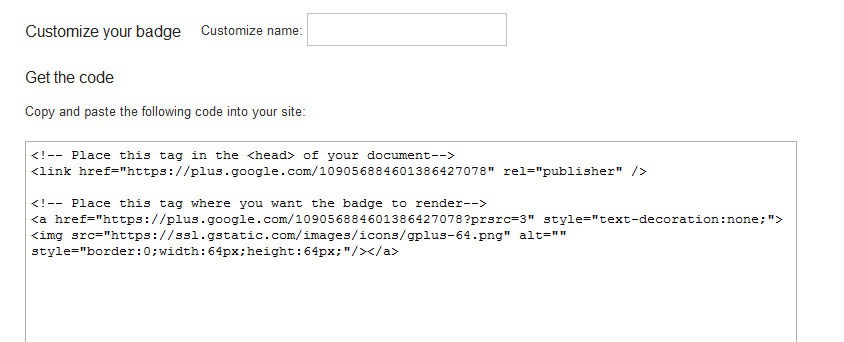
3.       You will have the option to adjust the code depending on the type of badge you choose to display, and your code snippet will automatically update, until you are left with some code like the following:
googleplus3 How to Create Google Plus Badge for Your Website


4.       Easy enough, you will follow the instructions conveniently placed within the code, placing the top portion in the head of your template file editor and the bottom portion of the code where you want your badge to display.

Here’s how Google+ Page Badge for my Social Media Branding with Kim Garst Page looks after adding it: 

googleplus4 How to Create Google Plus Badge for Your Website


About Kim

Comments

  1. If add in changing width,length and color setting in badge style will be more prefect.

  2. Google Plus is winning field as days pass by, Google + is everywhere so it was about time I was going to put a Google Plus badge on my website too. Thanks to you, I read here how to create a badge and I published it on my website, it's really useful. Thanks for sharing!

  3. Your blog is amazing, as I will begin my Google Plus account today for my business Jurney Jurray Jewelry http://www.jurneyjurray.com thank you for providing such detailed and helpful information. You Rock!!!

  4. Pretty impressive information dude :) Tnx 4 this 8)

  5. Google + is really making its run nowadays. So it is important that you keep your site with the latest in the internet world and one of the ways if by creating badges of different social networks. Thanks for sharing this useful information.

  6. Thanks for posting such an easy tutorial! 

  7. One of the reasons many webmasters and bloggers could not use the Google+ badge is, the height and width are not customizable and many templates do not allow using the current dimensions of the Google+ badge. Hopefully, Google would soon come up with a customizable badge.
    Here is a work around, that works perfectly:
    You can use CSS to adjust the height and width of the Google+ badge. This may not be the final solution, but works great. 
    You can see the <a href='http://www.zlobber.com/resources/10049-How-customize-Google-badge-adjust-width.aspx'>how to use CSS to customize Google+ badge</a>.
    All you have to do is, insert some custom CSS style in to the header  of the webpage and tune the some attribute values to fit in to your layout.

    • ooohhh, thank you, John! I have run into this a number of times and could not resize so I totally appreciate the tip!

  8. Thanks so much Kim! I did it! However, I can't seem to get my icons to go left to right, they are aligned top to bottom. hmmm…..? Can't seem to figure out the alignment of my icons.  Any pointers? Thanks! Blessings to you and all of your wonderful help! :)

  9. Thanks for this step by step article. If I wanted to add this to my WordPress site, do you know which .php file I add it to? Or maybe there is a quick plugin I can use?
    Thanks!

  10. I think this works a lot better if you have a Google+ brand page. It displays a lot more information that makes clicking on the bad more enticing than if you were to use a bade for just your personal Google+ account.

  11. Everything is very open with a precise description of the issues. It was really informative. Your site is useful. Many thanks for sharing!

  12. Hello! This is my first visit to your blog! We are a group
    of volunteers and starting a new initiative in a community in the same niche.
    Your blog provided us valuable information to
    work on. You have done a marvellous job!

  13. Hi! Do you use Twitter? I’d like to follow you if that would be ok. I’m
    absolutely enjoying your blog and look forward to new posts.

  14. I know this if off topic but I’m looking into starting my own weblog and was curious what all is needed to get set up? I’m assuming
    having a blog like yours would cost a pretty penny? I’m not very internet savvy so I’m not 100% positive. Any suggestions or advice would be greatly appreciated. Thanks

    • No it is not expensive to start a blog. You should buy a domain and invest in some quality branding but otherwise, the biggest expense is your time.

  15. I was suggested this web site via my cousin. I am no longer sure whether this submit is written by way of him as no one
    else know such unique approximately my trouble.
    You are amazing! Thanks!

Speak Your Mind

*

↑ Top of Page
Buffer