



In late September, Facebook launched the new timeline look. At that time, I wrote an article on How To Get Your New Facebook Timeline Now. Since that time, Facebook has made the process much simpler and I wanted to share how you can grab the new timeline look in a few quick and simple steps.
Step 1: Log in and Click
Make sure that you are logged into your Facebook account and then click here to get started.
Step 2: Grab Your Own Timeline
Scroll to the bottom right of the page and click on "GET TIMELINE". Scroll back to the top of the page and click "PUBLISH NOW".
Step 3: Edit Your New Timeline
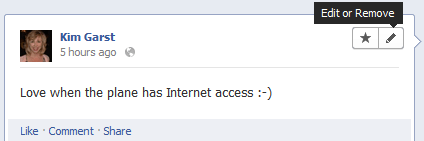
Scroll through your new timeline and edit or remove any items that you may not want to show up in your timeline. To do this, hold your cursor over the upper right corner of the item that you want to edit. A pencil icon and a pop up will appear that reads Edit or Remove. Choose whichever one works for you.
Step 4: Making Changes
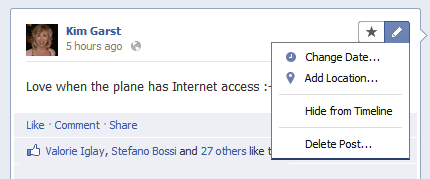
If you click on the pencil icon you will see options to Change Date, Add Location, Hide From Timeline and Delete Post. This gives you a lot of options for controlling what is visible in your timeline.
Step 5: Highlight Your Best Posts
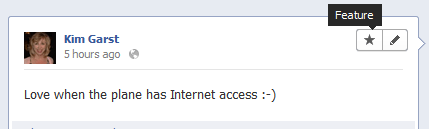
You can choose to highlight your best posts by clicking on the star icon that is to the left of the pencil icon. If you click on this for a particular post, that post will be expanded the entire length of your profile and made larger. This is a great way to highlight something particular that you want your audience to notice first when they land on your page.
Step 6: Publish Now
Or you can wait until December 22 when Facebook will do the change for you. In my opinion, there really isn't any need to hold out because, on December 22, all Facebook users are going to be converted to the new timeline. It is best to take this step yourself and set up your timeline with what you wish to be viewable in this new format.

One of the really great things about Facebook's new timeline is that you can actually brand your personal profile using the ecover graphic area at the top of the new timeline format. Click here to see how I have branded my personal profile to reflect my personal as well as my business life. Please leave me a note and let me know you dropped by :-)!
To receive Kim's "30 Fun and Creative Ways To Increase Your Facebook Likes", click here.

About Author






Thanks for these tips! I am one of those who haven't switched over yet, because I thought it would be very time consuming. However, looking at what you've laid out here, it seems very doable.
I wasn't so sure in the beginning, but now that I've had the new timeline for a while, I really like it. It's much easier to find and read than the old one.
I set up my timeline last week. I wasn't sure if I would like it, but I do! I enjoyed reading stuff posted from several years ago! It gives you more of an idea of who that person is rather than reading a resume-like profile.
I made the switch the other day. I'm adjusting. Just wish I had paid attention and noticed I could have changed it weeks ago. Oh well, all things in their due time. Thanks for your guidance; I know where to turn to if I get stuck.
Thanks for sharing. Switching over now. 🙂
Thank you for making the change so easy, Kim! I like the fact that we can have more control over what everyone sees. I wasn't sure I liked it at first but now I do!
Thanks for the tips. You helped me understand how to update my Facebook so that it shows how I want people to see me.
What a nice step by step tutorial, Kim. I haven't made the switch yet, haven't had much time to do it. Also I do blame Facebook a bit for their lack of instructions or even a heads up when they make these changes. 🙂 This seems easy enough.
Thanks!
Such a clear article! Thanks for the tips on editing our timelines…I am still trying to tweak mine.
Thanks so much for clearing this up Kim! I had no idea the that you could highlight some of your posts…that for me, is great news! I'm looking forward to learning how to also better "brand" my cover page! Thanks for sharing with us!
Kim – thanks for the step by step directions. Im hesitant about using the timeline because I didn't like the idea of people being able to quickly and easily go back to my posts from three to four years ago, but based on what im reading here – I can control that!
She you can go through your timeline and “hide” what you don’t want others to see.
Once you change the timeline, you cannot change back. Soon, you won’t have a choice as FB is going to change it for you. Go for it 🙂
Thanks for the info about highlighting your best posts, I hadn't discovered that one yet. I know people are constantly complaining about Facebook changes, but I think they've really done good this time. I love the new timeline, although it does take some practice, like everything new. Thanks Kim, your blog is always relevant and full of good advice.
I love the new timeline. I like the look and how you can choose to highlight a story or feature certain photos.
Hey Kim! Thanks so much for this post it's one of "those" things I've been meaning to get round to doing and this is the best step by step I've found so far – thank you!!
Tracy x
Thanks Kim! I had already switched but have not played with it much! Love that we can highlight a post with that star feature! I need to pencil in time to play! 🙂
I've heard mixed reviews on this Timeline feature. But these are great tips and you make it so easy to follow. Thank you for all your tips Kim!
This is very helpful info! I have been having a problem with the timeline and maybe you can help! Since I moved to the timeline, I have been having a hard time with the Pages of others that I have "liked"- #1 I am not seeing comments from pages that I have liked in my newsfeed and #2 I can only find the list of the pages that I have liked when using my iPhone. Thanks!
Steven, The way keep all your favorite pages in one place is to make a list.
1. MAKE A NEW LIST, FIND THIS ON YOUR HOME PAGE LEFT HAND SIDE. YOU CAN CALL IT PAGES IF YOU LIKE.
2. GO TO EDIT LIST.
3. AT THE TOP LEFT IS A DROP DOWN BAR, SELECT PAGES, THEN ADD YOUR FAVORITE ONES.
4. IF YOU ADD THE LIST TO YOUR FAVORITE LISTS ON YOUR HOME WALL YOU CAN SELECT IT WHEN YOU WANT TO SEE ALL THE PAGES YOU HAVE CHOSEN.
Hi Kim, I'm just following through from the awesome opportunity you provided to your fans yesterday to share our blogs and read each other's latest post. I was entertaining a three-year-old little girl (my niece) yesterday so couldn't get onto my laptop. You get my first comment and I'm really looking forward to reading the others. Keep up your amazing work – I love it!
You cannot add someone if they do not have a Facebook account.
i didn't get the GET TIMELINE option here please help me out of this i want to active timeline on my facebook………………………………..
Were is my time line
How do i get my time line up
Do you have your timeline already or wanting to get it? So many have it already so wanted to make sure before I followed up on this.