
How To Remove or Block Someone From Your Facebook Fan Page
Have you ever had someone posting inappropriate content or try to incite another fan on your Facebook fan page? It could simply be someone who tries to use your wall as their advertising platform. If you have asked nicely and they simply won’t stop, what are your choices? How can you remove or block them from your page?
Here is the step-by-step process of how to remove or block someone from your Facebook Fan Page.
1. Go to the Banned Users tab.
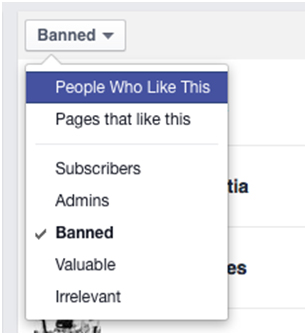
I know, it is confusing going to the Banned Users tab before you have even banned someone but that is where you have to start! Go to Settings, click on Banned Users, and you should see a box that says ‘Banned’. Click on the arrow, and change this to ‘People Who Like This’. This will bring up a list of everyone who likes your Page. If you need more assistance, check out the Facebook Fan Page Help Center!
2. Find the person you want to remove.
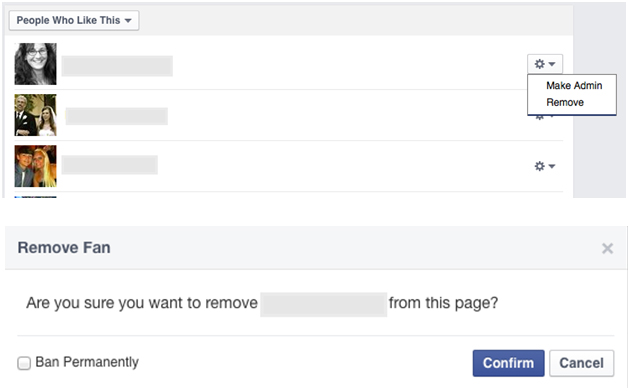
Click on the arrow next to their name, and select ‘Remove’. Once you click on this, you will also be given the option to permanently ban them.
 3. Oops! I didn’t mean to ban him! How to reverse a ban.
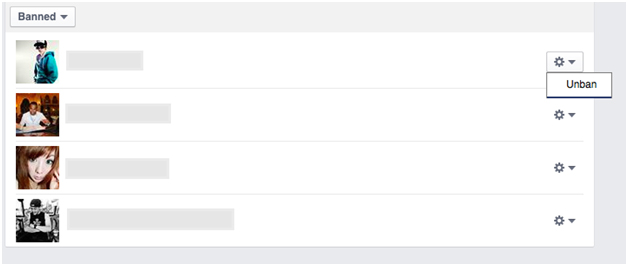
Finally, if you find you’ve mistakenly banned someone and would like to remove the ban, simply go through the same process, but select ‘Banned’ from the drop down list instead of ‘People Who Like This’. Click on the arrow to the right of the person’s name, and you should see the option to “unban” them.
And that’s how to remove or block someone from your Facebook Fan Page!
Hopefully this isn’t a process you need to do frequently, but don’t feel bad blocking or removing fans who are just out to cause trouble. Better to keep your Page a safe, fun and informative resource than to let someone stir up trouble! If you would like to learn more on banning and removing someone from your page, visit Facebook's Help Center.
About Author


44 thoughts on “How To Remove or Block Someone From Your Facebook Fan Page”
HI Kim, Have a client who doesn't want a FB page since they are afraid a customer might complain… TY for your insight!
Yes, you can delete comments on your fan page.
do note you can’t remove spiteful fake negative review ratings .. you can get rid of the comments but not the star rating
No, you cannot.
I had the same question, thanks!
Glad this helped, Rachel!
Hello, When I clicked “People who like this” Facebook only shows the most recent likers who liked my page and it only shows a limited number of likers even after I clicked all the See All buttons. I want to remove someone who liked my page a long time ago.
You cannot remove someone from your fan page. You can block them from posting but you cannot force them to unlike your page.
There is no good way unfortunately.
There is. Do a youtube search there’s some great videos explaining the process.
Without going through your entire fan base, I would suggest waiting until they post something and then blocking them at that point in time.
How do you block them after they post something? I don’t see the way. Thanks in advance.
There is an option to delete or remove/ban someone on Facebook.
Thank you so much for sharing!
You can block them from posting on your fan page but your fan page (not your personal profile) is public and can always be viewed by anyone.
Thanks Kim! 😀
Hi Kim! I have done a little research and I cannot find any way to block someone from messaging you on your fan page. HOWEVER, I did find this…https://www.facebook.com/help/121128704635070/ and https://www.facebook.com/help/199655413426788/ maybe they will help.
Thank you going the extra mile and researching this for me. You are such a blessing! I will pass the info along.
You will need to block her from both your profile and your fan page, unfortunately blocking from one does not carry over to the other.
hi, can you kindly tell me where I can find “see all”, because my new likes section can’t see “see all” list, thank you
You can delete any of the comments that you choose to on your fan page. You do have to be logged in to do so.
I cannot see him when I log in because I have blocked him. He only has access to my fan page, and I can only see his comments when I am not logged it.
Unfortunately, there isn’t a way to block someone from in-boxing you.
I banned someone but he can still keep liking my page, I banned him so many times! I clicked ban permanently already but he still can come and like my page again!
You cannot stop someone from liking your page. It is public BUT you can block them from posting on your page.
Hi! I’ve followed the steps you told me to in the picture and it didn’t work, but I went to something else in the page and I found out how. But thanks though!
When they post on your page, ban them.
Fan pages are public and you cannot keep people from seeing them.
That depends on whether Facebook’s algorithum shows your content to them or not. Fan pages are public so you can’t keep them from seeing your content. They won’t be able to post on your page though.
Unfortunately, the functionality you are requesting is not currently available. We will keep your suggestion in mind as we continue to improve Facebook.
I permanently banned a fan from my fan page.
We have a lot of great tips to help you navigate the new page. Keep tuning in and know that there will always be changes. Just hang in there. -Boom Care Squad – Aida
Glad to hear this, Gautam!
I do not know how to Blog could you please help me.
Not sure why Facebook does what it does. I wish that we could still see all of our fans too!
Thanks for noticing, Damian 🙂
You have to block them or they can still comment on your page.
No, you cannot remove something from someone else’s page, unfortunately. You can remove the tag but not the post.
You can’t ban him. Fan pages are public and content can be seen even by all, even those that are banned. Those that are banned cannot comment or like anything on the page.
You can’t ban someone from ‘seeing’ your page. It’s a public page but you can ban them from commenting, liking, etc.
You can’t keep people from seeing your page as it’s “public”. The only thing you can do is ban someone from posting and/or liking or commenting on your page. The only way to ban him on your fan page is to wait until he posts something.
Thanks!
Yes, you can. You need a little bit of HTML skills to do it.
Awesome blog. I love it!