
Did you know that there is a simple tip you can employ TODAY to get your Pinterest images and boards ranking #1 on Google? I know this sounds like a dream, but it’s a strategy SEO-savvy marketers have been using recently with GREAT success.
You probably already know that Pinterest is a great source of referral traffic (second only to Facebook in terms of visits to sites from social networks). Here is how it works…if someone goes onto Pinterest and searches for a particular topic (for instance, ‘fall fashions 2014’) and your image or board pops up in the results, you can potentially generate referral traffic to your site.
But what I am talking about today is a little bit different. You may have noticed that when Googling a particular topic, some of the results are actually Pinterest boards and pinned images.
This is because Google LOVES Pinterest, and is far more likely to give top rankings to a Pinterest board than a small website that doesn't get much traffic or engagement.
So how do you get #1 Google rankings using Pinterest?
Keep reading as I am going to give you the secret sauce!
Your first step will be to choose a keyword or phrase you want to rank for on Google. Your best bet will be to choose a long tail keyword that’s not highly competitive. For instance, let’s say I sell gourmet coffee and coffee accessories, and am located in Miami, Florida.
I could either brainstorm some keywords myself (like ‘gourmet coffee Miami’), or I could start typing something in the Pinterest search bar, like so:

Pinterest automatically suggests some popular phrases other users have typed in, giving me the inside scoop into what’s being searched for. From the suggestions, I might choose to target the phrase ‘gourmet coffee recipes’ (I will likely also want to target a phrase that uses my city or state if I am a locally-based business).
Next I create a board and call it – you guessed it – Gourmet Coffee Recipes. Once the board is created and I have populated it with all sorts of images of fabulous gourmet coffee creations, I get busy promoting my boards, and accumulating likes and repins. For tips on how to make this happen, see my post 10 Pinterest Tips for Small Business Pinners.
Over the coming weeks and months, I will want to make sure I’m adding lots of new content to the board; I will also want to make sure every new pin I add incorporates my chosen keywords, preferably near the beginning of the image caption.
We know that Google looks at Pinterest image captions as the ‘anchor text’ of your image, so it is VERY important you are using your keywords in your board title AND image descriptions!
As my board gets more and more populated with content, Google recognizes that the content contained in my board is ‘fresh’ (and Google LOVES fresh, new content!). And the more and more popular my board gets (through likes and repins), the more Google recognizes that people like what they are seeing. And it is at this point that my board starts to move up in the Google search rankings.
Take a look at this example of a Google search for ‘fall fashions 2014’:
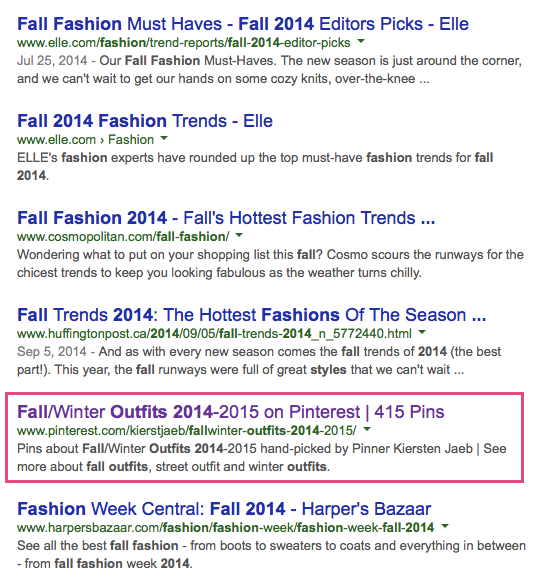
While this pinner hasn't reached #1 rankings just yet, you will see she is ranking right up there with Elle magazine, Cosmo, Huffington Post and Harpers Bazaar! Do you think she could have ever achieved these kinds of rankings for her own website? Probably NOT!
Final Thoughts
I often tell people when creating board titles and image captions on Pinterest to focus on what people are likely to be looking for. So for instance, rather than creating a board called ‘My blog posts’, use this valuable space to incorporate keywords your audience would be searching for.
What if the pinner of the fall fashions 2014 board above had failed to use her keywords in the title of her board? She never would stood a chance of ranking on Pinterest OR on Google!
So to summarize:
- Choose keywords (preferably long tail) that your audience is likely to be looking for
- Create a board using those keywords in the title, and/or images with those keywords in the caption
- Promote your board and consistently add new content
- Watch your Google rankings TAKE OFF!!!
And there you have it! The secret to getting #1 rankings on Google using Pinterest.
Still wondering if Pinterest is right for you? Check out my post Social Media Strategy: Is Pinterest Right for Your Business?.
Have you used Pinterest to rank in Google? What tips or techniques do you use to get your boards and images ranking? Share below!
About Author

30 thoughts on “The Secret to Getting #1 Rankings on Google…Using Pinterest!”
Thanks for sharing, Kim! Allie and I were just going over Pinterest SEO and will add these tips to the agenda!
Good advice, Kim! My Clients will love it. Thank you for sharing!
thanks for the tips. we are starting to see some traffic to our dot com and etsy stores from pinterest.
WOOHOO! Doing a happy dance for you, Julie!
Thanks for sharing this great information,
Hello, I liked your article, it has helped me a lot in this respect and from today. I will follow it. Your site, and put into practice what you teach on your site! thank you
Pretty! This was a really wonderful post. Thank you for providing these details.
This article is exactly what I needed to start getting more traffic to my businesses through Pinterest and Google. Thanks for putting together this simple and straightforward, actionable article.
Pinning, Following, Scheduling and even un-following were never so easy on Pinterest. It even takes time to grow on Pinterest but not for me; I am using PinPinterest com for my Pinterest account automation. It can work for you 24*7 with its autopilot feature. You can even use it on the go due to its cloud storage facility.
Nice post thank you. Love to share this.
Thank you for sharing the valuable article.
Thanks, after implementing your tips finally I was able to rank my Pinterest board on Google.
I really like your blog. It helped me a lot. Entire details were given with easy to understand words. I wish you the best of luck for your future endeavors
Nice Post Admin!! this is really very good Article.
Very Very Helpful Blogs Post. I read Entire blog and its help me lot.
Thanks for sharing this.
Thanks for providing such an useful tips. It is still working in 2020
This is the precise blog for anybody who needs to find out about this topic. You positively put a brand new spin on a topic that’s been written about for years.
nice post I will update my board name accordingly
Great Article, Will keep these things in mind while doing SEO for clients
Thanks for sharing, You kept huge effort in this. For sure this will help us. Let me note down all this
Excellent! Kim – Thanks For the Information Regarding Pinterest .It’s really helping me for my knowledge
Thanks Again,
Regards,
Percoyo
This is so amazing and unbelievable. I like your info.
Great blog. Thanks for sharing info.
Google does not show my pins on search results. Is there anything I should do to get my pins indexed properly?
I’ve been going around your site for quite some time and man I’m glad to learn a lot about it. Thanks always for the information you share about SEO strategies and growing our business!
Ok so promoting is key right ?
I’m definitely going to try this! Thanks! The name of the board = keyword is genius!
Great post, it’s nice to see some informative post
Thank you!
Great info! I recently came across your blog and have been reading along.I am very happy with the content of your article it is very beneficial